



The future that never quite arrives
IPv6 has been “the future” for so long that an entire generation of developers has grown up treating its workarounds as normal. NAT, CGNAT, port-mapping gymnastics, broken peer-to-peer connectivity, and brittle VPN setups aren’t quirks of the internet. They’re recurring operational costs we keep choosing to pay, often without realizing we’re paying them at all.
I’ve been working in this industry long enough to remember when IPv6 adoption was supposed to be “just around the corner.” That was over fifteen years ago. And yet here we are in late 2024, and I still regularly encounter production systems, homelab setups, and even enterprise networks that treat IPv6 as an afterthought. Or worse, as something you actively disable because “it causes problems.”
The thing is, IPv6 doesn’t cause problems. Our collective reluctance to adopt it properly causes problems. And those problems have real costs that show up in your monitoring dashboards, your support tickets, and your Friday night debugging sessions.
Why is this migration taking so long?
IPv6 isn’t blocked by technology. The specs are mature, the tooling exists, and most modern operating systems, cloud providers, and ISPs have at least basic support. What’s missing is urgency.
The internet has gotten remarkably good at papering over IPv4 scarcity. Carrier-grade NAT (CGNAT) lets ISPs squeeze thousands of customers behind a handful of public addresses. NAT in general has become so ubiquitous that many developers think of it as a fundamental feature of networking rather than what it actually is: a workaround that became load-bearing infrastructure.
This creates a weird equilibrium. Things mostly work, so there’s no burning platform. The pain is distributed across millions of small inconveniences rather than concentrated in one dramatic failure that would force change. Your video call works (most of the time). Your game connects to the server (usually). Your self-hosted service is accessible (if you’ve memorized the right port-forwarding incantations).
And because things mostly work, the business case for IPv6 investment remains fuzzy. Try explaining to a project manager why you need to spend two sprints on “networking infrastructure improvements” when the app technically functions. I’ve had that conversation more times than I’d like to admit.
The hidden tax: where the pain actually shows up
The compromise we’ve all accepted isn’t free. It leaks pain into places you might not immediately connect to IP addressing.
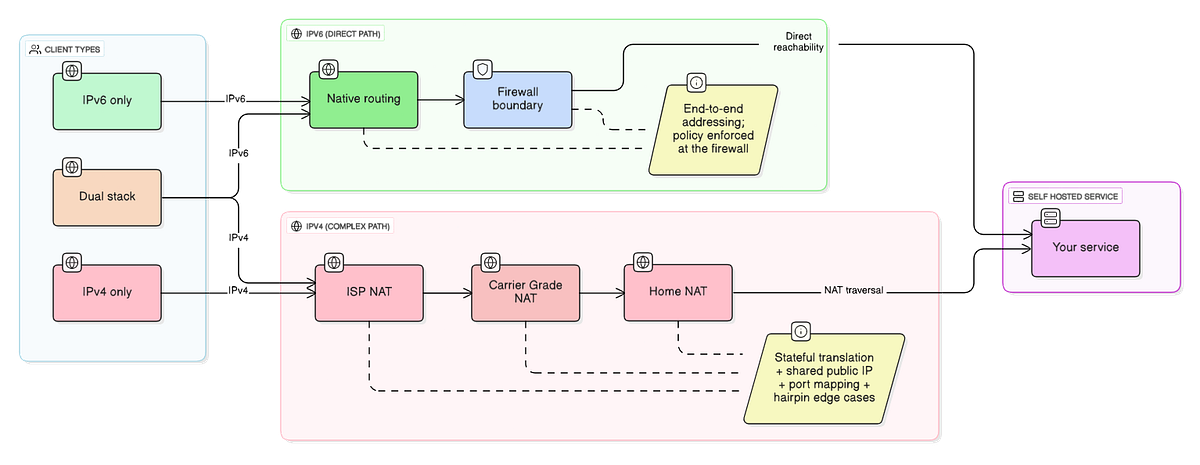
The “works on Wi-Fi but not on mobile” mystery. This is one of my favorites because it’s so common and so frustrating to debug. Your app works perfectly when users are on their home network, but the moment they switch to LTE, something breaks. Often this is CGNAT at work. Mobile carriers are some of the most aggressive users of CGNAT because they simply don’t have enough IPv4 addresses for every device on their network. The result is that your carefully crafted NAT traversal logic, which worked fine in testing, falls apart when it encounters the double-NAT situation that CGNAT creates.
Peer-to-peer that isn’t really peer-to-peer. Tools like WebRTC, file sharing applications, and remote access software all benefit enormously from direct connections between endpoints. But when both endpoints are behind NAT (and especially CGNAT), direct connections become difficult or impossible. The fallback is relay servers, which means higher latency, more infrastructure costs, and a dependency on a third party that you probably didn’t want.
I worked on a project last year where we spent weeks optimizing our TURN server infrastructure to handle the load from connections that should have been direct. The irony wasn’t lost on me: we were spending engineering time and cloud budget to work around a problem that IPv6 solves by design.
Self-hosting behind a wall you can’t control. If you’ve ever tried to expose a service from your home network, you know the dance. Check if your ISP gives you a real public IP (increasingly, they don’t). Set up port forwarding on your router. Hope that your ISP doesn’t block the ports you need. Configure dynamic DNS because your IP changes. Deal with hairpin NAT issues when you try to access your own service from inside your network.
With native IPv6, you get a globally routable address. Your service is reachable without the middleman gymnastics. Yes, you still need to think about firewalls (more on that later), but the fundamental reachability problem just… goes away.
The dual-stack tax. Many organizations have adopted IPv6, technically, by running dual-stack: supporting both IPv4 and IPv6 simultaneously. This is generally the right transition strategy, but it comes with its own costs. You’re now maintaining two network configurations, two sets of firewall rules, two DNS record types, and dealing with the fun debugging scenarios that arise when traffic takes different paths depending on which protocol the client prefers.
I’ve seen incidents where an application worked fine over IPv4 but failed silently over IPv6 because someone forgot to update the firewall rules for the AAAA records. The client happily connected via IPv6 (because that’s what Happy Eyeballs told it to prefer), hit a closed port, and the user saw a generic connection timeout. These bugs are subtle and time-consuming to track down.
What “IPv6 done seriously” actually looks like
Okay, so I’ve spent several hundred words complaining about the current state of affairs. Let me shift gears and talk about what a proper IPv6 deployment looks like, because “just enable IPv6” is not a strategy.
Clean dual-stack, not accidental dual-stack
Running dual-stack means intentionally supporting both protocols, not just having IPv6 turned on because that’s the default. Your services should bind to both protocols explicitly. Your load balancers should handle both. Your monitoring should track both.
The most common failure mode I see is services that accidentally work over IPv6 in development but break in production because nobody tested the actual IPv6 path. Your CI pipeline should include IPv6 connectivity tests, and ideally you should have a way to force IPv6-only connections during testing to catch these issues early.
DNS hygiene
DNS is where IPv6 deployments go to die. The symptoms are maddening: intermittent connectivity issues, slow initial connections, and the classic “it works for some users but not others.”
Here’s what happens. Your DNS serves both A records (IPv4) and AAAA records (IPv6). A client that supports IPv6 will typically try the AAAA first. If your IPv6 path is broken for any reason, the client experiences a timeout before falling back to IPv4. Modern clients implement Happy Eyeballs (RFC 8305) to mitigate this, but the mitigation isn’t perfect, and older clients don’t have it at all.
The fix is simple in concept: don’t publish AAAA records until your IPv6 path actually works. Audit your DNS, test the connectivity, and only advertise what you can deliver. Running dig AAAA yourdomain.com followed by curl -6 https://yourdomain.com should be part of your deployment verification.
Firewall-first thinking
This is where I see the most anxiety around IPv6, and honestly, some of it is justified. With IPv4 and NAT, your devices are “hidden” behind the NAT gateway by default. It’s security through obscurity, and it’s not real security, but it does mean that a misconfigured device on your network isn’t directly exposed to the internet.
With IPv6, every device can have a globally routable address. This is a feature, not a bug, but it requires you to think about firewalls differently. Your firewall becomes your actual security boundary, not the side effect of address translation.
The good news is that most consumer routers and operating systems have sensible defaults here. Inbound connections are blocked unless you explicitly allow them. But “sensible defaults” is not a security strategy. You should audit your IPv6 firewall rules, understand what’s allowed, and test it from outside your network.
For self-hosters and small teams, the mental model shift is: stop thinking “how do I poke a hole through NAT” and start thinking “what inbound connections do I want to permit through my firewall.” It’s actually a cleaner model once you internalize it.
Testing from real client networks
Your IPv6 might work perfectly from your office, your home, and your cloud provider. But what about the mobile carrier that’s doing something weird with IPv6 prefix delegation? What about the coffee shop wi-fi that advertises IPv6 but routes it into a black hole?
You need to test from real client networks, which means having test points outside your controlled environment. Services like test-ipv6.com are useful for quick checks, but for proper validation, you want to be making actual connections to your services from multiple network types.
I keep a small VPS in a different region specifically for this kind of outside-in testing. It’s cheap, and it’s caught issues that I never would have found from inside my own network.
A practical troubleshooting model
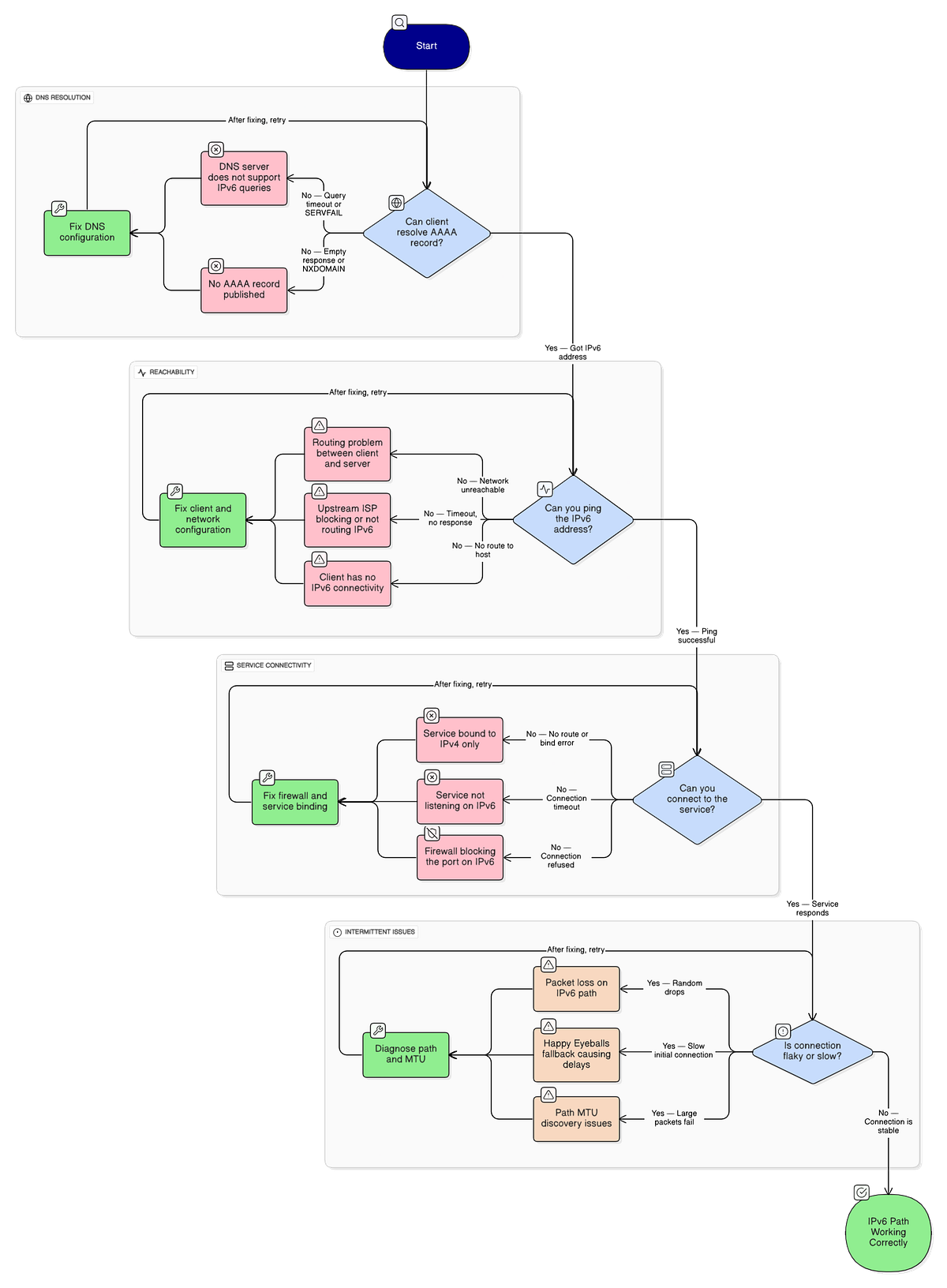
When IPv6 connectivity breaks, the debugging process can feel overwhelming. Here’s the mental model I use to narrow things down quickly.
Step 1: Validate DNS resolution. Can the client resolve your AAAA record? Run dig AAAA yourdomain.com from the client's perspective. If there's no AAAA record, that's your answer. If there is one, note the address and move on.
Step 2: Validate reachability. Can you ping that address? Try ping6 or ping -6 to the resolved address. If this fails, you have a routing problem somewhere between the client and your server.
Step 3: Validate the service. Can you connect to the actual service? Use curl -6 https://yourdomain.com or your protocol-appropriate equivalent. If ping works but the service doesn't respond, check your firewall rules and verify that the service is actually listening on IPv6.
Step 4: Check the path. If things are flaky rather than completely broken, you might have a path MTU issue. IPv6 doesn’t do fragmentation at intermediate routers like IPv4 does, so misconfigured MTU settings can cause packets to be silently dropped. Running traceroute6 can help identify where packets are being lost.
This four-step model won’t catch everything, but it catches maybe 80% of the IPv6 issues I encounter. The remaining 20% usually involves something vendor-specific or a misconfiguration that requires deeper diving.
What to do next
If you’re a self-hoster or part of a small team that’s been treating IPv6 as a “someday” project, here’s a phased approach that won’t require you to rewrite everything.
Phase 1: Audit your current state. Figure out what IPv6 support you already have. Does your ISP provide IPv6? Does your router support it? Are your servers getting IPv6 addresses? You might be closer to ready than you think.
Phase 2: Enable and test in a non-critical environment. Pick something low-stakes and get it working over IPv6. A personal blog, a development server, something where a misconfiguration won’t wake anyone up at 3 AM. Use this to build your mental model and work through the inevitable hiccups.
Phase 3: Fix your DNS and firewall hygiene. Before you advertise AAAA records for anything important, make sure your firewall rules are correct and your services are actually listening on IPv6. Test from outside your network.
Phase 4: Roll out to production with monitoring. Add IPv6 connectivity to your monitoring. Track success rates for both protocols. You want to catch regressions quickly.
Phase 5: Consider IPv6-only for new deployments. As your confidence grows, you might find that new services don’t need IPv4 at all. IPv6-only simplifies your configuration and eliminates an entire class of dual-stack bugs.
The IPv6 migration has been going on for longer than some developers reading this have been alive. That’s kind of embarrassing for our industry, honestly. We’re collectively paying a tax in complexity, debugging time, and architectural compromises because we haven’t collectively committed to finishing what we started.
The good news is that you don’t need to wait for the rest of the internet to catch up. Adopting IPv6 properly in your own infrastructure pays dividends now: simpler networking for self-hosted services, better peer-to-peer connectivity, and one less layer of NAT-shaped complexity to debug at 2 AM.
I’d love to hear about your IPv6 experiences, especially the weird edge cases and hard-won lessons. What’s blocking adoption in your environment? What unexpected benefits have you seen after making the switch? Drop a comment below or find me on Mastodon. These conversations are how we all get better at this stuff.