



The marketing copy makes everything sound roughly equivalent. Every tool promises to make you faster, catch bugs earlier, and handle the tedious parts of programming. The screenshots all look impressive. The demos all work.
Then you try to use them on real work and discover that deployment mode matters far more than feature lists. A cloud agent that excels at implementing a well-scoped feature from scratch may be a poor choice for the quick fixes you make fifty times a day. An IDE assistant that feels magical for inline completions may fumble badly when you ask it to coordinate changes across a dozen files. A local agent that gives you perfect transparency may be overkill when you just need a function renamed.
The right choice is not the most powerful tool, but the one whose tradeoffs match the job in front of you.
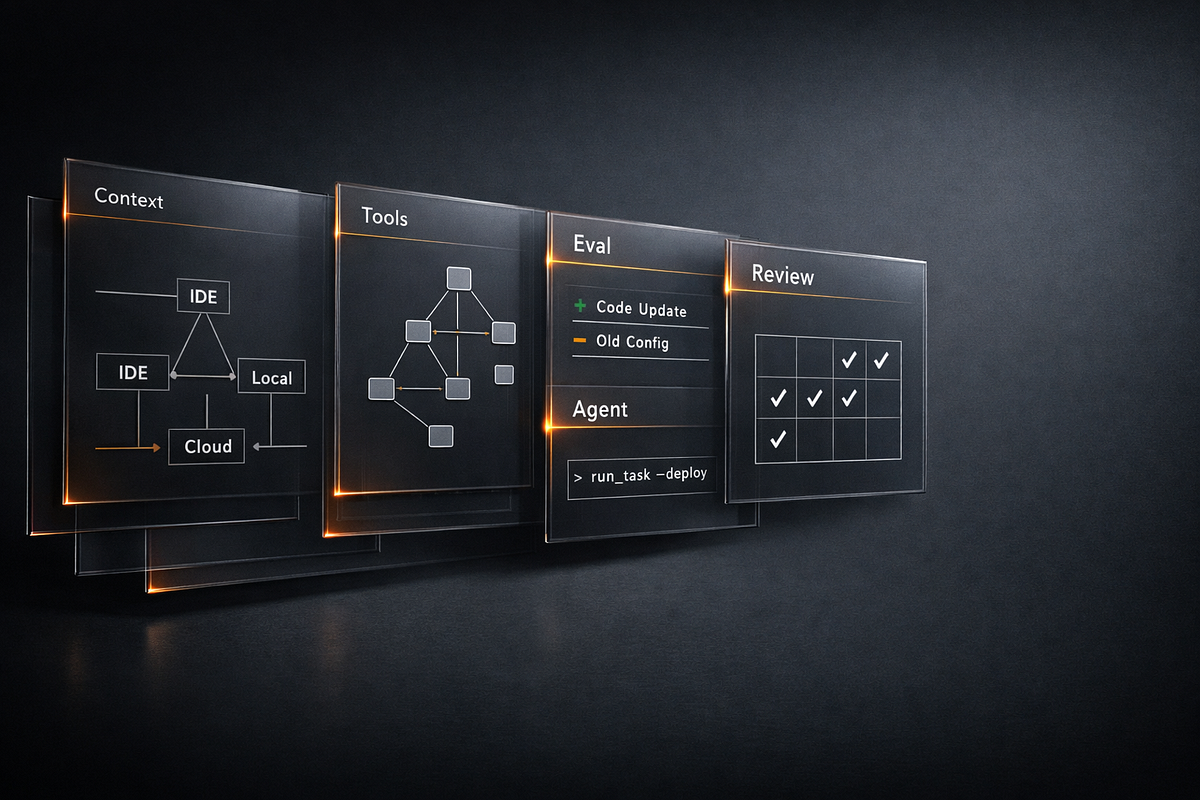
This piece breaks down three deployment patterns that people constantly conflate: the IDE assistant that sits beside you in your editor, the local agent that runs near your repository and shell, and the cloud agent that takes a task and works in a managed environment. Understanding what each is actually good at — and where each fails — will save you from the frustration of using a screwdriver as a hammer.
The three operating modes
Before comparing strengths, we need clear definitions. These categories describe where the tool runs and how it interacts with your code, not which vendor made it or what model powers it.
IDE assistants are extensions or plugins embedded in your editor. They see your open files, your cursor position, and often your recent edits. They respond to inline triggers — tab completion, quick-fix suggestions, chat panels within the editor. Examples include GitHub Copilot in VS Code, Cursor’s inline features, Cody, and the various JetBrains AI integrations. The key characteristic is tight coupling with your editing session. They help while you type.
Local agents run on your machine or local network with direct access to your filesystem, shell, and development environment. They can read your entire repository, run commands, execute tests, and observe the results. Claude Code, Aider, and similar tools fall into this category. The key characteristic is autonomy within your local context. They can take multi-step actions, but you watch them do it and can intervene at any point.
Cloud agents run in managed infrastructure, typically on the vendor’s servers or in sandboxed containers. You give them a task, they spin up an environment, clone your repository, work on it, and present results — often as a pull request or branch. GitHub Copilot Workspace, Devin-style tools, and various “AI software engineer” products work this way. The key characteristic is asynchronous delegation. You hand off a task and review the output later.
These categories have fuzzy edges. Some tools blur the lines — a local agent might call cloud APIs for inference while keeping execution local; an IDE assistant might have an “agent mode” that takes multi-step actions. But the core distinction remains useful: where does execution happen, how much autonomy does the tool have, and what is your relationship to its work while it runs?
The real strengths of each mode
Each deployment pattern has genuine advantages that become obvious once you use them for appropriate tasks. The problem is that vendors understandably emphasize what their tools can do, not what they should do.
IDE assistants: Low friction in the flow
The killer feature of IDE assistants is not intelligence — it is integration. When you are deep in a coding session, context-switching to another tool has cognitive cost. An assistant that lives in your editor and responds in milliseconds lets you stay in flow.
This matters more than it sounds. The difference between “think of what I want, type a comment, wait 200 milliseconds, hit tab” and “think of what I want, open a terminal, describe the task, wait for a response, copy the code, paste it into my file” is the difference between a tool you use constantly and a tool you use occasionally.
IDE assistants excel at:
- Inline completions where the context is obvious from surrounding code
- Boilerplate generation for patterns you know but do not want to type
- Quick lookups where you want a function signature or usage example without leaving your editor
- Small transformations like converting a callback to async/await or adding error handling to a block
- Documentation generation for the function you just wrote while it is still in your head
These are high-frequency, low-complexity tasks. You do them dozens or hundreds of times per day. Speed and low friction matter more than sophistication.
The mental model is a fast pair programmer who handles the mechanical parts while you focus on design decisions. You stay in control of the file; the tool just makes typing faster.
Local agents: Transparency and shell access
Local agents trade some of that tight integration for broader capability. They can see your whole repository, not just open files. They can run shell commands — build your project, execute tests, check linter output, inspect logs. They can make coordinated changes across multiple files.
More importantly, they do all of this where you can see it. When a local agent decides to modify a file, you can watch the diff appear in real time. When it runs a command, you see the output. When it makes a mistake, you can interrupt and correct it before it compounds the error.
Local agents excel at:
- Multi-file refactoring where changes need to stay coordinated across a codebase
- Iterative debugging where the agent can run code, observe failures, and adjust
- Test-driven workflows where the agent writes code, runs tests, and iterates until they pass
- Repository exploration where you want help understanding unfamiliar code
- Environment-specific tasks that require access to your local tools, databases, or services
The mental model is a junior developer sitting at your desk with access to your terminal. They can do real work, but you are watching and can step in whenever needed. The feedback loop is tight enough that mistakes get caught early.
This transparency has practical value beyond comfort. When something goes wrong, you know exactly what the agent did because you saw it happen. You can reproduce issues, understand the agent’s reasoning from its actions, and build accurate mental models of its capabilities and limits.
Cloud agents: Parallel work and handoff
Cloud agents flip the relationship. Instead of watching work happen, you delegate a task and review results. This sounds lazier, but it enables a different workflow entirely.
When work happens in a separate environment, you can start multiple tasks in parallel. You can hand off a feature implementation while you continue other work. You can let the agent iterate through compile errors and test failures without monopolizing your terminal. You come back to a branch that either works or has clear problems you can address.
Cloud agents excel at:
- Well-scoped feature implementation where the requirements are clear enough to specify upfront
- Parallel exploration where you want to try multiple approaches and compare results
- Long-running tasks that would block your local environment
- Greenfield scaffolding where you want a starting point to refine rather than building from scratch
- Tasks with clear success criteria where the agent can verify its own work through tests
The mental model is a contractor working in their own office. You write a clear brief, they deliver a result, you review and request revisions. The quality of the brief matters enormously because you are not there to clarify while they work.
This asynchronous model also has an underappreciated benefit: it forces you to think about task boundaries. If you cannot describe a task clearly enough for a cloud agent to work on it independently, that is useful information about how well you understand the task yourself.
Hidden tradeoffs people discover too late
Every deployment mode has costs that are not obvious from marketing materials or quick experiments. These hit hardest when you have already committed to a workflow.
IDE assistants: Context windows and file boundaries
IDE assistants see what your editor shows them, which is often less than you think. They typically have access to open files and maybe some surrounding context, but they do not see your whole repository. They cannot run your tests or check whether their suggestion actually compiles.
This leads to a specific failure mode: suggestions that look correct locally but break something elsewhere. The assistant has no way to know that the function it just helped you write has the same name as one in a different module, or that the API it suggested was deprecated last month, or that your project has a convention it violated.
The mitigations are straightforward but require discipline: review completions before accepting, keep related files open to broaden context, and treat IDE suggestions as drafts that need verification. The assistant accelerates typing, not thinking.
Local agents: The single-threaded problem
Local agents occupy your terminal and your mental bandwidth while they run. You cannot easily start a second agent task while the first is in progress. If the agent gets stuck or goes down a wrong path, you either wait or interrupt and lose the work so far.
This sounds minor until you have a slow task. Watching an agent try five different approaches to fix a test failure — running the test suite each time — can burn half an hour. That is half an hour you could have spent on other work if the agent were running elsewhere.
Local agents also inherit all the complexity of your local environment. If something works on your machine because of a specific installed version, an undocumented environment variable, or a file that exists outside the repository, the agent will use it. That makes local agents excellent for working the way you work, but it can hide portability problems you will discover later.
Cloud agents: Specification burden and review cost
Cloud agents demand clear task specifications upfront. You cannot clarify mid-task. If your description is ambiguous, the agent will pick an interpretation and run with it. If your requirements were incomplete, you will discover this when you review a pull request that technically does what you asked but not what you wanted.
This makes cloud agents heavily dependent on your ability to write good specifications — a skill that is harder than it looks and that improves with practice. Beginners often underspecify tasks, then blame the agent for the resulting mess.
The review cost is also real. A cloud agent that produces a 500-line pull request still requires you to review 500 lines. If the code is decent, that review is faster than writing it yourself. If the code has fundamental problems, you may spend as much time understanding and fixing it as you would have spent writing it from scratch — possibly more, because now you are working with someone else’s structure and decisions.
Cloud agents work best when you can verify results with tests, when the task scope is genuinely bounded, and when you are prepared to discard results that miss the mark. Using them for vague exploratory work usually creates more cleanup than value.
Which tasks belong in each mode
Matching tasks to tools is more important than picking a “best” tool. Here is practical guidance based on task characteristics.
Use IDE assistants when:
- The task is small and context is local to the current file
- Speed and staying in flow matter more than correctness guarantees
- You will immediately see and verify the result
- You are doing something you know how to do but do not want to type out
- The change is low-risk and easy to undo
Use local agents when:
- The task requires coordination across multiple files
- You need shell access — to run builds, tests, or other commands
- Transparency matters because you want to understand what is happening
- The task involves iterative debugging or exploration
- You are learning the tool and want to build mental models of its behavior
Use cloud agents when:
- The task can be clearly specified without real-time clarification
- Parallel work would help — you want to start this and do something else
- The task has verifiable success criteria, ideally automated tests
- Branch-based delivery fits your review workflow
- The task is large enough that delegation saves meaningful time
Some tasks can go in any category depending on context. A refactoring that touches two files might be fastest with an IDE assistant if you have both files open. The same refactoring across twenty files is better suited to a local agent. If it is one of several refactorings you want to try in parallel, a cloud agent makes sense.
Scenario walkthroughs
Abstract guidance is useful, but concrete examples make patterns stick. Here are three realistic scenarios with different tool choices.
Scenario 1: Adding error handling to an API endpoint
You have an Express route handler that calls a database function and returns the result. Currently it has no error handling — if the database call fails, the server crashes. You want to add try/catch, proper error responses, and maybe some logging.
Best fit: IDE assistant. This is a small, localized change. You know exactly what you want. Context is contained in one file. The task is quick enough that waiting for a response would be slower than typing with inline help.
With an IDE assistant, you might select the function body, ask for error handling, review the suggestion, adjust the error message, and move on. Thirty seconds, back to your next task.
A local agent could do this, but you would spend more time describing the task than doing it. A cloud agent is overkill — by the time you write the specification and review the PR, you could have made the change five times.
Scenario 2: Migrating a module to TypeScript
Your project has a utility module in JavaScript that you want to convert to TypeScript. It exports a dozen functions used throughout the codebase. You need to add type annotations, create interfaces for the data structures, and update import statements in files that use the module.
Best fit: local agent. This task touches multiple files, and you want to verify that the result actually compiles and that tests still pass. You also want to watch the agent’s type choices — some decisions about strictness and interface design should reflect your judgment, not defaults.
With a local agent, you can describe the migration, watch it work through the files, interrupt when you see a type decision you disagree with, and let it run the TypeScript compiler to catch errors. You stay close enough to guide decisions while the agent handles mechanical work.
An IDE assistant could help file by file, but you would be coordinating the changes yourself. A cloud agent could work, but you lose the opportunity to adjust type definitions as you see them — you might get something that compiles but does not match your preferences.
Scenario 3: Implementing a new feature from a spec
Your team has written a detailed specification for a new user registration flow. It includes API endpoints, validation rules, database schema changes, and test cases. The spec is clear and the feature is self-contained.
Best fit: cloud agent. This is the sweet spot for delegation — a well-specified task with clear success criteria (the tests), large enough that it would take real time, and independent enough that you do not need to clarify as it progresses.
You can start the cloud agent working on this feature, shift to other work, and come back to a pull request. If the agent produced clean code that passes the specified tests, you review and merge. If it missed something, you have a concrete artifact to give feedback on.
A local agent could do this, but it would occupy your terminal for an extended period. An IDE assistant would require you to coordinate all the pieces yourself. The cloud agent’s asynchronous model matches the task shape.
A branch-based review example
Cloud agents often deliver results as pull requests or branches. This workflow has specific benefits that are worth understanding in detail.
Suppose you ask a cloud agent to add pagination to an existing API endpoint. The agent clones your repository, creates a branch, makes changes, and opens a pull request. Here is what you gain from this model:
Isolation. The agent’s work does not touch your working tree. If you are in the middle of something, there is no conflict. You review when ready.
Standard review tools. You can use your normal code review process — diff views, line comments, CI checks — rather than whatever interface the AI tool provides.
Easy rejection. If the result is bad, you close the PR and delete the branch. There is nothing to undo in your local environment.
Incremental feedback. You can comment on specific lines, push commits to the branch to fix issues yourself, or ask the agent to revise. The conversation stays attached to the code.
Team visibility. If others should see the AI-generated code, it is already in your normal PR workflow. Review responsibilities are clear.
This model works best when your project has good CI — automated tests, linting, type checking. A cloud agent that can run CI and iterate until checks pass delivers much higher quality than one that just generates code and hopes.
The model works worst when specifications are ambiguous, when success criteria are subjective, or when the task requires understanding context that is not in the repository. A cloud agent implementing pagination from a clear spec is reliable; a cloud agent deciding how to restructure your navigation based on vibes is unpredictable.
Hybrid workflows that combine tools
Experienced practitioners rarely use just one tool. They combine tools based on task phase and feedback needs.
Cloud agent for scaffolding, local agent for refinement. Start a new feature with a cloud agent that produces a working skeleton — basic structure, stub implementations, initial tests. Then switch to a local agent to iterate on the details, watching each change and verifying behavior as you go. This captures the cloud agent’s strength at parallel work while using the local agent’s transparency for polish.
IDE assistant for flow, local agent for integration. Write new code with IDE completion keeping you fast. When you have a working piece, use a local agent to integrate it — update imports in other files, add it to exports, write the test file. The IDE assistant handles high-frequency small actions; the local agent handles lower-frequency multi-file coordination.
Local agent for exploration, cloud agent for implementation. When facing an unfamiliar codebase, use a local agent to explore — ask questions, make small probing changes, understand structure. Once you understand what needs to happen, specify a clear task for a cloud agent to implement at scale. Exploration benefits from tight feedback; implementation benefits from delegation.
All three for different phases of the day. Morning deep work might favor local agents where you want transparency and flow. Afternoon meetings might mean kicking off cloud agent tasks you will review tomorrow. Quick fixes between meetings go to the IDE assistant. The tools serve your schedule, not the other way around.
The point is that different tools fit different moments, and the cost of switching is lower than the cost of using the wrong tool persistently.
Don’t use this mode for that job
Some misfits are common enough to call out explicitly. If you find yourself frustrated with an AI coding tool, check whether you are making one of these mistakes.
IDE assistants for large refactoring. If you are changing the same pattern across twenty files, inline completion is the wrong tool. You will accept the same suggestion twenty times, miss inconsistencies between files, and have no verification that everything still works. Use a local or cloud agent that can see the whole scope and run tests.
Local agents for quick one-liners. If the task is small enough to describe in a sentence and implement in a line, a local agent is overhead. By the time you explain the task and wait for a response, you could have typed it. Use your IDE assistant or just type.
Cloud agents for vague exploration. “Improve the authentication flow” is not a specification. A cloud agent will interpret this somehow, produce changes, and you will spend longer understanding its interpretation than you would have spent just thinking about what you actually want. Use a local agent to explore options interactively, then specify clearly for delegation.
IDE assistants for anything requiring shell access. If the task requires running commands — building, testing, database migrations — your IDE assistant cannot help directly. It can write the code, but it cannot verify the code works. Use a local agent that can execute and observe.
Cloud agents when you need clarification mid-task. If you discover a requirement ambiguity while reviewing partial results, the cloud agent cannot engage in real-time discussion. You have to reject, re-specify, and restart. If you anticipated needing to clarify, use a local agent where you can interrupt and adjust.
Any AI tool when you do not understand the domain. If you cannot review the output effectively, you should not be delegating. This applies regardless of deployment mode, but it is especially risky with cloud agents where you may not see intermediate states. Build understanding first, then accelerate.
Comparison chart
The following table summarizes key characteristics across deployment modes. Use it as a quick reference, not a substitute for understanding the tradeoffs discussed above.
Decision tree
When facing a task, work through these questions to choose a deployment mode.
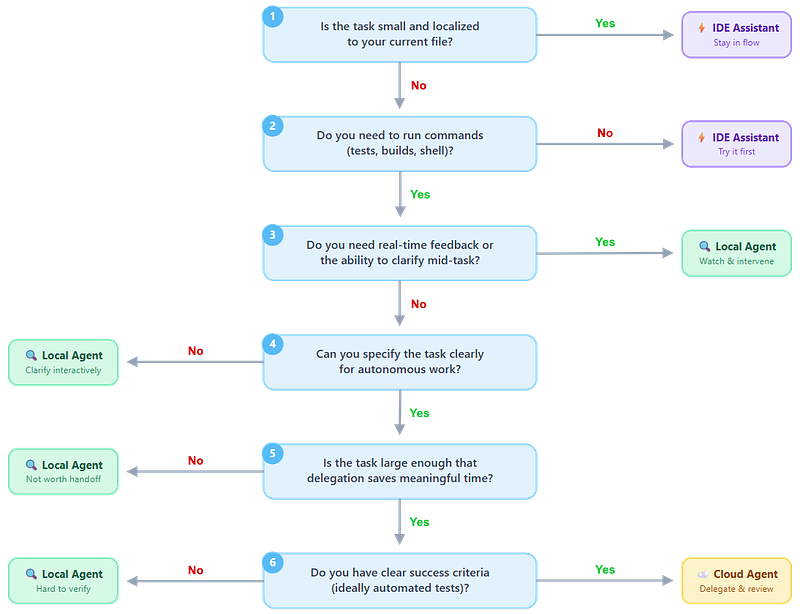
This is a heuristic, not a rule. Experience will tune your judgment. When in doubt, start with the tool that gives you more control — you can always delegate more later, but it is harder to regain oversight once you have lost it.
What this means for tool selection
If you are choosing which tools to learn or adopt, deployment mode should weigh heavily. A mediocre tool in the right mode will often outperform an excellent tool in the wrong mode.
For most individual developers, having one good tool in each category provides flexibility without overwhelming complexity. An IDE assistant you use constantly, a local agent you use for multi-file work, and access to a cloud agent for larger delegation covers the realistic task spectrum.
For teams, the calculation includes additional factors — standardization, security review, workflow integration — but the same principle applies. Ensure each mode is covered, and provide guidance on when to use which.
The tools will keep changing. New features blur category lines. Models get faster and more capable. But the underlying tradeoffs — latency versus capability, transparency versus delegation, tight feedback versus parallel work — reflect inherent constraints on how humans and AI systems can collaborate. Understanding those tradeoffs gives you a framework that survives the next product launch.
The right choice is the tool whose tradeoffs match the job in front of you — not the most powerful one. Match your tools to your tasks, and the frustration of using AI coding tools turns into the productivity gains the marketing promised.
To Top